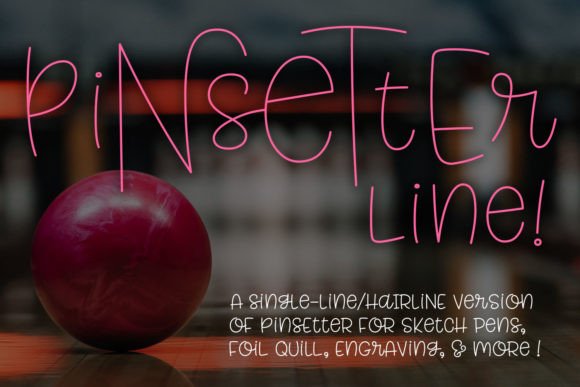
Pinsetter Line single Line: The Smart Choice for Sketch Pens, Foil Quills, and Precision Drawing Tools
If you’ve ever tried to cut or draw clean, consistent lettering with a Cricut, Silhouette, or engraving tool—and ended up wrestling with thick outlines, overlapping paths, or inconsistent line weights—you’re not alone. That’s exactly why Pinsetter Line single Line exists: it’s built from the ground up for tools that draw *one continuous stroke*, not fill shapes. No extra cleanup. No path simplification headaches. Just crisp, intentional lettering that behaves the way your pen, foil quill, or infusible ink tip expects.
What Makes Pinsetter Line single Line Different?
This isn’t a standard font you drop into Word or Google Docs. Pinsetter Line single Line is a purpose-built vector typeface designed exclusively for stylus-based workflows. It comes in two practical formats—single-line (for compatible programs like Inkscape with proper extensions or certain CAD tools) and hairline (the go-to version for Illustrator, CorelDRAW, Cricut Design Space, and Silhouette Studio). Both versions contain the full Pinsetter family: Littles (the base alphabet), Middles (slightly taller alternates), and Talls (bold, expressive capitals)—all mapped to the Private Use Area (PUA) of Unicode. That means no hunting through glyph panels: just install, type, and access alternates instantly via keyboard shortcuts or character maps.
You also get a handy PDF reference sheet—no guesswork when you need to copy-paste a specific Tall “S” or swap a Middle “a” mid-project. And yes—you can safely install both file types. They won’t conflict, and most users find it helpful to keep both on hand while learning which format their machine or software prefers.
Where It Actually Fits Into Real Workflows
For small business owners making custom merch: Imagine hand-lettering a boutique coffee bag label with your Cricut’s foil quill. With Pinsetter Line single Line, the script flows naturally—no jagged corners, no double-traced letters, no manual node editing. You size it once, send it to cut/draw, and walk away. Same goes for engraved wooden coasters, leather journal covers, or vinyl decals for food trucks. The hairline version plays nicely with Cricut’s “draw then cut” mode, so your text stays perfectly aligned with surrounding graphics.
For educators and makers running workshops: When you’re teaching teens or adults how to use a Silhouette Cameo for the first time, simplicity matters. Pinsetter Line single Line eliminates the “why does my ‘e’ look broken?” frustration. Students type normally, choose an alternate from the font menu, and see immediate, professional-looking results—even at 12 pt. No need to explain compound paths or outline conversion. That saves 20 minutes per class and builds confidence fast.
For freelance designers prepping files for laser engravers or CNC routers: You know the drill—clients ask for “something handwritten but legible.” Instead of tracing a scanned sketch or paying for custom vector lettering, you drop in Pinsetter Line single Line, adjust tracking for rhythm, and export clean SVGs. Its consistent stroke weight (0.001 pt in hairline, true single-path in the single-line version) ensures even burn depth on wood or acrylic. No surprises at the machine.
When You’ll Reach for It (and When You Won’t)
You’ll reach for Pinsetter Line single Line when your goal is *movement*, *texture*, or *handmade authenticity*—not perfect symmetry or bold impact. It shines on wedding place cards drawn with an infusible ink pen, on chalkboard-style signage for a local bakery, or on embroidered patches where stitch count matters. It’s also ideal for accessibility-focused projects: its open counters and generous spacing improve legibility for low-vision users when rendered at larger sizes.
You won’t use it for body copy in a brochure, for headlines printed on glossy stock, or for web text (it’s not webfont-optimized). And if your project needs strong contrast—like a high-impact poster headline—it’s better paired with a bold companion font than used alone. That’s not a limitation—it’s focus. Pinsetter Line single Line knows what it’s for, and it does it well.
What to Check Before You Install
- Your software supports hairline or single-line fonts. Most modern vector and cutting apps do—but older versions of Silhouette Studio (before 5.0) or free-tier Cricut Access plans may restrict advanced font features. Test with a free sample first if possible.
- Your tool actually draws—not cuts outlines. If your machine uses a blade or rotary tool for *cutting* letter shapes (not drawing them), this font won’t help. Save it for pens, quills, engravers, and styli.
- You’re comfortable with PUA access. On Mac, use the Character Viewer; on Windows, try the built-in Emoji panel or a third-party glyph browser. The included PDF removes the guesswork—just copy what you need.
One last realistic note: Pinsetter Line single Line works best when sized appropriately. Below 14 pt in Cricut Design Space, some fine details (like the crossbar on a lowercase “t”) may not render cleanly on slower-drawing machines. At 20 pt and up? It sings. That’s not a flaw—it’s physics. Thin lines need space to breathe.
Why This Isn’t Just Another Font Download
It’s easy to scroll past another “handwritten font” listing—especially when dozens promise “script,” “elegant,” or “modern calligraphy.” But Pinsetter Line single Line solves a specific, recurring pain point: the gap between how fonts are traditionally built and how drawing tools actually function. It respects the limits of hardware and the needs of real people—whether they’re launching a side hustle, prepping classroom materials, or adding personal flair to a gift.
No extra plugins. No font converters. No hours spent redrawing letters in Illustrator just to make them cuttable. Just one clean, well-structured package—with all three alphabets, smart encoding, and two reliable formats—that fits into your existing workflow like it was made for you. Because it was.